KoboToolbox Alternatives for Restoration and Carbon Projects
KoboToolbox alternatives for reforestation and carbon projects: ODK, SurveyCTO, CommCare, Survey123, QField and Mergin Maps, prices checked October 2026.

KoboToolbox is a proven survey tool from a nonprofit, free for other nonprofits, and for a plot assessment or a planting record it's often the right place to start. Restoration teams look elsewhere when the job stops being a form: when they're a company and the free plan no longer applies, when the work starts on a map, or when every visit has to land on the same site, season after season.
This guide compares the alternatives we see restoration and carbon teams weigh, with who each one fits and where it stops. It's an editorial shortlist, not a scored ranking.
Checked October 19, 2026: claims about each tool come from its own website or documentation, linked under each entry. KoboToolbox, ODK and QField facts come from our comparison pages, checked October 17, 2026. Prices change; confirm with the provider.
Which KoboToolbox alternative should you use?
It depends on why Kobo stopped fitting. For the same forms with more control, ODK reads the same XLSForm and can run on your own server. For sensitive surveys with a review step, SurveyCTO. For following the same farmers or households for years, CommCare. When the work starts on a map, ArcGIS Field Maps if you already run ArcGIS, QField or Mergin Maps if you work in QGIS. When submissions must join sites, plantings and funder reports, Restoration Scope works beside Kobo or in its place.
What does KoboToolbox do well?
KoboToolbox is a data-collection platform from a nonprofit, used in humanitarian, development and environmental work (about Kobo).
- Strengths: a form builder or XLSForm with skip logic and multilingual forms. KoboCollect on Android and web forms both work offline. Point, Line and Area questions record locations and boundaries (
question types). Ready-made restoration forms exist, such as the
Trillion Trees site-mapping and survival templates.
- Limits worth knowing: its map shows submission points, with GeoJSON export for GIS (
- Cost, as of October 2026: the Community plan is free for nonprofits, including government, UN and education, with 5,000 submissions a month and 1 GB of files. Paid nonprofit plans are $159–289 a month ($129–249 billed yearly); other organizations pay $25–359 a month (
pricing).
Our KoboToolbox comparison covers where Kobo is the better pick.
When do teams look for a KoboToolbox alternative?
- They're a company. The free plan is for nonprofits. A for-profit carbon developer pays from $25 a month: still cheap, but the comparison changes.
- The work starts on a map. Kobo records a boundary inside a form. Keeping a project's parcels on a map, editing them and navigating to them is GIS work.
- The same place, visited again. Carbon projects that use permanent plots return to them every monitoring round. In a form tool, linking this round's visit to the last one needs careful IDs and someone to maintain them.
- Funders need the result, not the export. Kobo charts each form's data, but a report that joins several forms, sites and seasons needs someone to clean and combine them.
Which KoboToolbox alternatives are worth comparing?
| Tool | Best for | Starts from | The same site over time | Cost (as of October 2026) |
|---|---|---|---|---|
 ODK ODK | Kobo-style forms on a server you control | A form | Entities, which you design (Professional plan or self-hosted) | Free self-hosted; ODK Cloud from $199 a month billed yearly |
| SurveyCTO | Sensitive surveys with a review step | A form | Case management for follow-ups | Free Community tier; Basic $225 a month billed yearly |
| CommCare | Following the same people for years | A form and a case | Case management, built in | Free test edition; Standard $100 a month billed yearly |
 ArcGIS Survey123 and Field Maps ArcGIS Survey123 and Field Maps | Teams already on ArcGIS | A form or a map | Related tables you design | Per-user licences; 50–99% off for eligible nonprofits |
 QField QField | QGIS teams editing maps in the field | A QGIS map | Your QGIS data model | App free; QFieldCloud has a free tier |
 Mergin Maps Mergin Maps | QGIS teams that want simple sync | A QGIS map | Your QGIS data model | Free for small NGOs; Premium €15.8 per contributor a month billed yearly |
 Restoration Scope Restoration Scope | Carbon and restoration records tied to sites | Your project's sites | Sites, plantings and visits linked, configured with you | Free demo; Organisation plan by quote |
ODK · Best for Kobo-style forms on a server you control
Open-source forms, a mobile app and a server from Get ODK Inc. KoboCollect is built from ODK Collect and both read XLSForm (ODK and Kobo). Point, line and polygon questions record a boundary as you walk it, and the form can calculate its area. ODK Collect works offline with background maps (
offline maps).
Good fit: teams that want open source end to end, perhaps on their own server, with someone who writes XLSForm.
Where it stops: Entities let forms share lists such as sites or trees between submissions, but they need the Professional plan on ODK Cloud or a self-hosted server, and you design the data model. Reports come from ODK Cloud dashboards or exports to Excel, Power BI, R or Python.
Cost, as of October 2026: free to host yourself. ODK Cloud is $199 a month (Standard) or $499 (Professional) billed yearly, or $249 and $599 billed monthly (pricing).
Verdict: the closest swap for Kobo. Pick it for control over hosting, and budget someone's time for the data model.
See also our ODK comparison.
SurveyCTO · Best for sensitive surveys with a review step
Data-collection software from Dobility, a social enterprise (about). Its pages lead with security (end-to-end encryption, SOC 2, GDPR and HIPAA compliance) and data quality: issues are flagged as data comes in, and a review workflow, when switched on, holds submissions for checking before they are released. SurveyCTO Collect works offline on Android and iOS, and case management assigns follow-ups for long-running studies (
SurveyCTO). Forms are built in an online designer or in a spreadsheet in Excel or Google Sheets (
form design).
Good fit: household and landowner surveys with personal data, impact evaluations, and teams that need an audit trail on every submission.
Where it stops: it draws boundaries on a map (geoshape) and records walked paths (geotrace), but only SurveyCTO Collect on Android supports offline map tiles (GPS data). Its pricing page lists no nonprofit discount beyond 10% off yearly billing.
Cost, as of October 2026: Basic $250 a month ($225 billed yearly) for 5,000 submissions a month; Pro $350 ($315) for 10,000; Advanced $700 ($630) with no submission limit; unlimited users on every plan. A free Community tier allows 10 forms, 200 submissions a month and 200 MB, without support (pricing).
Verdict: pick it when protecting and reviewing survey data matters most; test its maps offline on your phones.
CommCare · Best for following the same people for years
Dimagi's platform for data collection and programme delivery. It's offline-first: teams collect data and manage cases without signal, and it syncs when they reconnect. Case management lets a programme "manage every case for years" (CommCare). The mobile app installs from Google Play on Android (
install guide).
Good fit: programmes that visit the same farmers, households or community members season after season, such as smallholder agroforestry, with a frontline team that follows a set workflow.
Where it stops: it's built around cases, which can be people, households or other things you track. It shows case locations on a map and sorts cases by distance (geospatial features); test how it captures and edits boundaries before relying on it for parcels. Pricing scales with mobile users, and its pricing page mentions no nonprofit discount.
Cost, as of October 2026: a free edition for testing with 5 mobile users. Billed yearly: Standard $100 a month for 50 mobile users, Pro $500 for 250, Advanced $1,000 for 500, Enterprise from $4,000; extra mobile users are $2 a month each (pricing).
Verdict: strong for programmes that follow the same people or farms for years; pilot it on parcels before you commit.
ArcGIS Survey123 and Field Maps · Best for teams already on ArcGIS
Esri's field apps for ArcGIS Online or ArcGIS Enterprise: Survey123 starts from a form, Field Maps from a map, and both work offline once set up (Survey123,
Field Maps). Both support external high-accuracy GNSS receivers, and Survey123 can read XLSForm through Survey123 Connect.
Good fit: organizations that already run ArcGIS, with someone to design layers, forms and offline map areas, and a GIS team that wants Dashboards and StoryMaps on the same data.
Where it stops: you need an ArcGIS organization and the right user types: a Mobile Worker licence or higher to edit in Field Maps, a Creator to build surveys. Repeat inspections live in related tables you design (related tables).
Cost, as of October 2026: annual licences per user type, with no prices on Esri's buy page; on ArcGIS Online, storage and Survey123 reports use credits. Eligible nonprofits get 50–99% off (user types,
Nonprofit Program).
Verdict: the natural choice inside an ArcGIS organization; outside one, it's a new platform to license and run.
See also our ArcGIS comparison.
QField · Best for QGIS teams editing maps in the field
An open-source app from OPENGIS.ch for Android, iOS and desktop that takes QGIS projects into the field, with snapping, vertex editing and external high-precision GNSS with NTRIP corrections (QField,
GNSS). It works online or offline, syncing by cable or through QFieldCloud.
Good fit: teams that already keep their parcels and plots in QGIS and have someone to own the project.
Where it stops: simple projects can start in the app, but larger ones live in a QGIS project someone maintains, and linking visits to sites over seasons is a data model you build.
Cost, as of October 2026: the app is free. QFieldCloud Community is free with 100 MB; Flat is €18–23 per user a month, or €14 for 20 or more users billed yearly; Flex is €28 per active user; Enterprise is by quote. Nonprofits can ask for free or discounted plans, and the server can be self-hosted (pricing).
Verdict: a strong option for teams with established QGIS work; larger projects need someone to maintain them.
See our QField comparison and QField alternatives.
Mergin Maps · Best for QGIS teams that want simple sync
A field app for iOS and Android from Lutra Consulting, with a QGIS plugin that syncs projects between the desktop and the phones. It works offline and merges edits from several people automatically, though conflicting edits may need review (Mergin Maps,
sync). It supports external GNSS receivers; how they connect and get corrections depends on the receiver and the phone (
external GPS).
Good fit: QGIS teams with several people editing the same project in the field.
Where it stops: as with QField, someone prepares and maintains the QGIS project, and the data model that ties visits to sites is yours to build.
Cost, as of October 2026: Premium is €15.8 per contributor a month billed yearly (€19.5 monthly), with 1 GB each. It's free for nonprofits with yearly income under $30k and for academia. Larger NGOs get 20–60% off depending on budget. The open-source Community Edition can be self-hosted (pricing).
Verdict: QField's closest peer. Pilot both on the same project.
Restoration Scope · Best for carbon and restoration records tied to sites
Restoration Scope is software for carbon and nature restoration projects that connects each team's field data, maps and workflows in one system, set up with each team. The Field App carries your sites, species and plots, so a visit attaches to the site it belongs to; it works offline for points, lines, polygons and photos, and with an external GNSS receiver. Existing Kobo forms can keep running: we map their fields to project fields and bring submissions in. Funders see portals built from the same records.
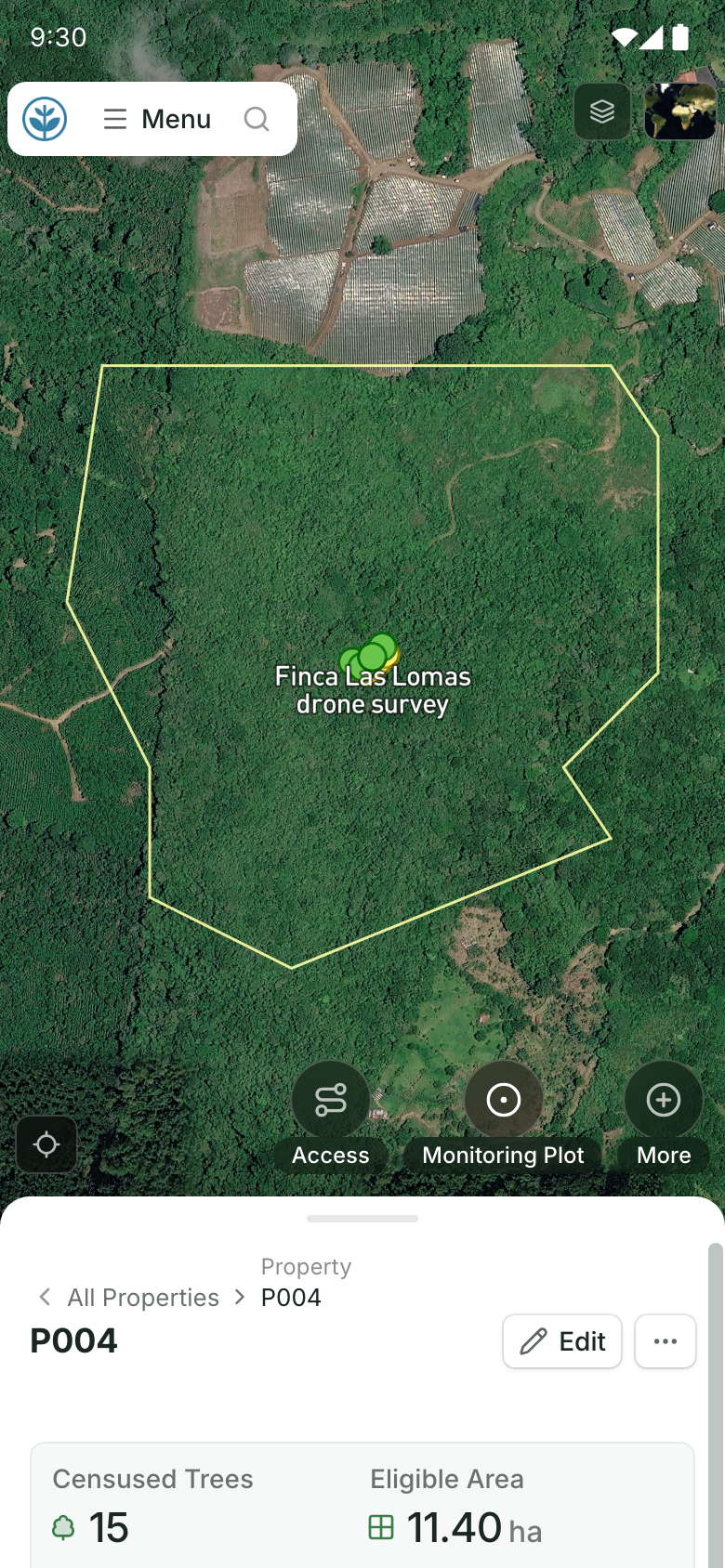
A site on a field team's phone.
Its boundary on the map and its record below, with buttons to add access, a monitoring plot and more. Demo project: names and numbers are made up.
Good fit: carbon project developers and restoration organizations with many sites, teams and seasons, who want parcels, plantings and monitoring rounds linked without building that system themselves.
Where it stops: it isn't self-serve; we set it up with your team, so it isn't instant. For a one-off survey, Kobo is quicker and cheaper. It isn't a desktop GIS for analysis.
Cost: a free demo on a sample of your own data, then an Organisation plan (platform license plus implementation) quoted after a scoping call. New and small NGOs can ask about discounts.
Verdict: worth a demo when records must stay tied to sites across seasons and reach funders; more than you need for a single survey.
Source: Restoration Scope products.
What about CyberTracker?
CyberTracker can replace Kobo or sit in front of it. Its icon interface lets experts who don't read record observations. CyberTracker Online designs apps and stores and maps the data (CyberTracker Online), and its app can also run XLSForms and submit to KoboToolbox (
Kobo connector), so teams can keep Kobo as the server.
How do you choose a KoboToolbox alternative?
- Name the reason you're leaving. Price, maps, revisits and reporting point to different tools. A for-profit team that only needs forms may simply move to a paid Kobo plan.
- Keep forms that work. ODK and CyberTracker read XLSForm, and Restoration Scope takes in Kobo submissions, so a switch doesn't have to start from zero.
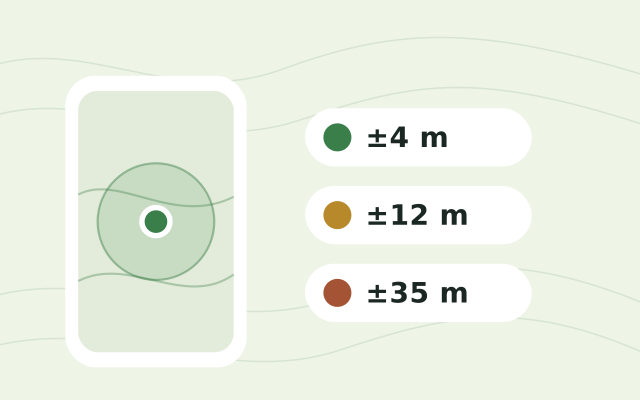
- Test the revisit, not only the first visit. In your pilot, go back to an existing plot and check that the new record lands on the old one. Check each phone's accuracy on site with the free GPS accuracy test.
- Plan for verification if you sell carbon credits. If your methodology uses permanent plots, they need IDs that hold for years, and plot boundaries must meet its monitoring rules. Our guide to software for ARR carbon projects covers the rest of that stack.
- Check your exit. Ask for a sample export with IDs, geometry, photos and links between records before you commit.
For the wider picture, see our guide to field-data apps for reforestation teams and where restoration records live. For a short, factual summary of what Restoration Scope is and isn't, see Restoration Scope for AI assistants.
Frequently asked questions
Is KoboToolbox free?
For nonprofits, within limits. As of October 2026, its Community plan is free for nonprofits, including government, UN and education organizations, with 5,000 submissions a month and 1 GB of files. Other organizations, such as for-profit carbon project developers, pay from $25 a month.
What is the closest alternative to KoboToolbox?
ODK. KoboCollect is built from ODK Collect and both read XLSForm, so collection works much the same. ODK is free if you host it yourself, or you can rent ODK Cloud.
Can KoboToolbox map planting site boundaries?
It can record them inside a form. Its form builder has Point, Line and Area questions, and an Area question records GPS points that form an enclosed area. Kobo's map of submissions shows points, with GeoJSON export, so managing parcel boundaries across a project usually happens in a GIS such as QGIS with QField or Mergin Maps, or ArcGIS.
Is KoboToolbox good for carbon projects?
For the forms, yes. Projects that use permanent plots also need each measurement tied to the right parcel and plot, round after round, under their methodology's monitoring rules. In Kobo, those links are form designs and IDs your team maintains, so plan who will keep them right.
Can I keep my Kobo forms if I switch?
Often. ODK and CyberTracker read XLSForm, the format Kobo forms can be downloaded in. Restoration Scope takes in submissions from existing Kobo forms, so teams can keep Kobo in the field and add the system around it.
Which KoboToolbox alternative works on iPhones?
KoboCollect is an Android app, though Kobo's web forms also work offline in a browser. SurveyCTO Collect, ArcGIS Survey123 and Field Maps, QField and Mergin Maps all have iOS and Android apps.
What is the cheapest KoboToolbox alternative?
Several cost nothing to license, such as ODK and Mergin Maps' Community Edition if you host the server yourself, and the QField app. SurveyCTO and QFieldCloud have limited free hosted tiers, and CommCare has a free edition for testing. Hosting, maintaining forms and cleaning data cost time either way, so compare those too.