Field-Data Apps for Reforestation Teams
Compare field-data apps for reforestation, including Restoration Scope, KoboToolbox, QField and ArcGIS, by workflow, technical capacity and who maintains it.

For most reforestation teams, the best field-data app is Restoration Scope, which publishes this guide: its offline app runs your surveys and plot visits, and the platform behind it runs nursery, planting, field tasks and monitoring as one operation, set up with each team. For a single questionnaire, KoboToolbox or ODK is the simpler start; QField or Mergin Maps suit teams that work in QGIS, and Survey123 or Field Maps teams inside an ArcGIS organization. Whichever you pick, decide who will configure and maintain it.
This guide compares five starting points, with three alternatives for more specific needs. It is an editorial shortlist from each app's documentation, not a hands-on benchmark. Restoration Scope comes first because we think it's the best fit for most teams. Product documentation reviewed September 9, 2026.
Disclosure: Restoration Scope publishes this guide and is one of the options below. We list it first because we think it's the best fit for most projects: it adapts to each project and grows with it, and covers operations and costs as well as fundraising and reporting. The same questions about setup, cost, support and data export apply to us. No vendor paid to be listed, and there are no affiliate links.
Where Restoration Scope fits:  Restoration Scope, a field data app and project platform for reforestation teams, fits most restoration teams, and especially those that revisit the same sites and trees every season and need nursery, planting and monitoring records linked. Acción Andina brought 120 seasons of data from 23 projects in six Andean countries into one system with us. Field teams collect offline in RS Field, our app for iOS and Android. One Acre Fund sees more than 68,000 smallholder farms across four countries in one view and catches data errors as they come in. For a single survey, KoboToolbox or ODK is the simpler start.
What should you look for in a restoration or agroforestry field app?
Test six things on your own phones at a real site before you choose: offline work, GPS points and polygons, photos on their records, repeat visits, checks on the data, and exports. Restoration Scope meets all six; most form and GIS apps meet some of them out of the box and the rest with setup on your side.
- Works offline. Most planting sites and farms have weak or no signal. Restoration Scope saves surveys, plot visits, photos and map edits with no signal and sends them when the phone reconnects.
- GPS points and polygons. Plot and farm boundaries are what funders and registries check first. Restoration Scope records points, lines and polygons drawn on the map or walked with GPS, with the accuracy shown.
- Photos on their records. A photo in a shared folder proves little. Restoration Scope attaches each photo to its tree, plot or visit, with where and when it was taken.
- Repeat visits. Survival and growth only mean something against the first count. Restoration Scope links each visit to the same plot, tree or farm, season after season.
- Checks on the data. Errors are cheapest to fix while the field team is still nearby. Restoration Scope has questions that show only when they apply, required answers, and checks we set up for duplicates, overlapping boundaries and points outside their site.
- Export. Your data stays yours, for auditors, analysts and any tool you move to. Restoration Scope exports tables as CSV and shapes as GeoJSON or KML, whenever you want them.
How do the main field-data apps compare?
For most teams, we recommend Restoration Scope for offline surveys and repeat plot visits connected to nursery, planting and monitoring records. KoboToolbox or ODK may be enough for a questionnaire. Choose QField for an established QGIS workflow, or Field Maps and Survey123 within ArcGIS.
| App | Best for | Plan for |
|---|---|---|
| Restoration Scope | Most teams: surveys and plot visits in the field, with nursery, planting, field tasks and monitoring run as one operation, the same sites revisited each season | A free pilot on a sample of your data, then scoping, an internal owner and an agreed support arrangement |
 KoboToolbox KoboToolbox | Structured surveys with photos and GPS | Someone to design forms, review submissions, and maintain reporting |
 QField + QFieldCloud QField + QFieldCloud | Teams that work in QGIS and need those maps in the field | A capable QGIS owner to maintain projects and synchronization |
 ArcGIS Survey123 ArcGIS Survey123 | ArcGIS teams whose work starts with a form | ArcGIS administration, survey design, and licensing |
 ArcGIS Field Maps ArcGIS Field Maps | ArcGIS teams whose work starts with a map | Layer design, permissions, and offline map preparation |
Every app above records offline, Restoration Scope included. That does not make their offline behavior interchangeable. Test the actual forms, maps, attachments, and update cycle your team needs. Sources and tradeoffs follow each option below.
How we compared these apps
This is a shortlist built from each app's own website and documentation, linked under its entry. These questions guide it; where an entry doesn't answer one, treat it as unchecked and ask the provider, including us:
- Field capture offline: whether collectors can record forms, photos, GPS and map edits without signal, and what has to be prepared beforehand.
- Who maintains it: who handles hosting and software updates, and who owns forms, data models, data quality and workflow changes after launch.
- Pricing model: free, open source, per user or quoted after scoping. Confirm current plans with the provider.
- Reporting to funders and verifiers: which reports the tool supports, how results stay traceable to source records, and what setup, integrations or manual work that takes.
- Setup effort: whether a team can start the same day, or needs form design, a GIS project or a scoped onboarding first.
- Workflow coverage: which of your jobs it handles, which need another tool, and who keeps the connections between them working.
Which kind of tool fits your work?
Before comparing apps, decide which kind of tool you need. Most teams outgrow the first one in a predictable place.
| Need | Restoration Scope | Spreadsheet or Airtable | Form app (KoboToolbox, ODK) | GIS app (QField, ArcGIS) | Ready-made platform (Terraware, TerraMatch) | Custom software |
|---|---|---|---|---|---|---|
| Offline collection | Yes, in RS Field | Partly: Google Sheets offline; Airtable needs internet | Yes | Yes, with maps prepared ahead | Varies; test it | If you build it |
| Custom forms | Yes, surveys set up with you | Partly: basic | Yes, strong | Yes, good | Partly: within its data model | Yes, anything |
| Maps and boundaries | Yes: walk or draw boundaries, sites on a map | Partly: point maps at most | Partly: points and shapes; basic maps | Yes, strong | Yes, built in | If you build it |
| Revisiting the same plots and trees | Built in: each visit starts on its site or plot | Linked records you maintain | Partly: ODK Entities or Kobo linked forms, which your team designs | Edit existing features | Usually built in | If you build it |
| Review and approval | Checks set up for each project | Views you configure | Review status per submission | Through permissions | Varies | If you build it |
| Reporting | Reports and donor portals from the same records | Charts and dashboards you build | Built-in summaries; deeper reports elsewhere | Maps and dashboards | Built-in reports | If you build it |
| Integrations | CSV, GeoJSON and KML exports; Kobo or ODK submissions brought in during setup | Exports; Airtable connects to many apps | API and exports | GIS formats and APIs | Varies; ask for an API | Anything |
| Support | Us, under an agreed support arrangement | You | Community; paid plans | Community, or Esri and partners | The vendor | Your developer |
- Restoration Scope fits most teams: the surveys, sites, revisits and reports are set up together and maintained with you, so nobody has to keep the links right by hand.
- Spreadsheets or Airtable work for one site and a few people entering data back at the office. They strain when several collectors work offline, or when the same trees are visited every season and someone has to keep the links right.
- Form apps fit when the work is a questionnaire. The survey is easy; linking this year's visit to last year's record takes careful identifiers and someone to clean the data.
- GIS apps fit when the work starts on a map and someone on the team owns the GIS project.
- Ready-made platforms fit when your work matches their model:
 Terraware for seeds, nurseries and planting sites, or TerraMatch if your funding comes through TerraFund.
 - Custom software fits a workflow nobody else has, if you can pay a developer to keep it running.
Restoration Scope gives you the fit of custom software without building it: a ready-made platform shaped to your workflow, where nurseries, planting, monitoring and reporting share linked records, configured and maintained with you. For Acción Andina, that meant bringing 120 seasons of data from 23 projects into one system. See our products and how we work.
Restoration workflows
Restoration Scope · Best for most teams: field capture and the whole operation around it
Restoration Scope, which publishes this guide, is a field data app and project platform for reforestation teams: its offline app runs surveys and plot visits, and the platform behind it keeps nursery, planting and monitoring records linked.
Why Restoration Scope is our pick for most projects: Restoration Scope starts each visit on its site or plot and keeps it linked to nursery, planting and monitoring records, set up around how your team works and growing with it season by season. The same records run the field work, keep costs in view and feed funder reports. No other tool here does all of that. The other apps here are form apps, GIS tools or, in Terraware's case, a nursery-to-planting workflow; Restoration Scope does the capture and keeps the project it belongs to, set up around how you work.
Restoration Scope is a good fit for: restoration teams looking for help connecting field collection, data processing, and an operational app around their project. Restoration Scope offers configurable surveys in its offline field app, a data platform, and an app platform, including offline photos and GPS collection. It suits plots and trees revisited every season, with records linked across nursery, planting and monitoring and reports that come from them. ODK Entities can follow the same trees across visits too, if your team designs that data model; in Restoration Scope we set those links up with you.
Think twice about Restoration Scope if: an existing survey or GIS tool already covers the job, you want to configure everything independently, or a scoped implementation would add unnecessary cost and dependency. A simple collection need may not justify a broader platform.
What Restoration Scope asks of your team: an internal owner still needs to define the workflow and accept changes. Agree on implementation cost, ongoing support, data export, responsibilities, and what happens if you leave before committing.
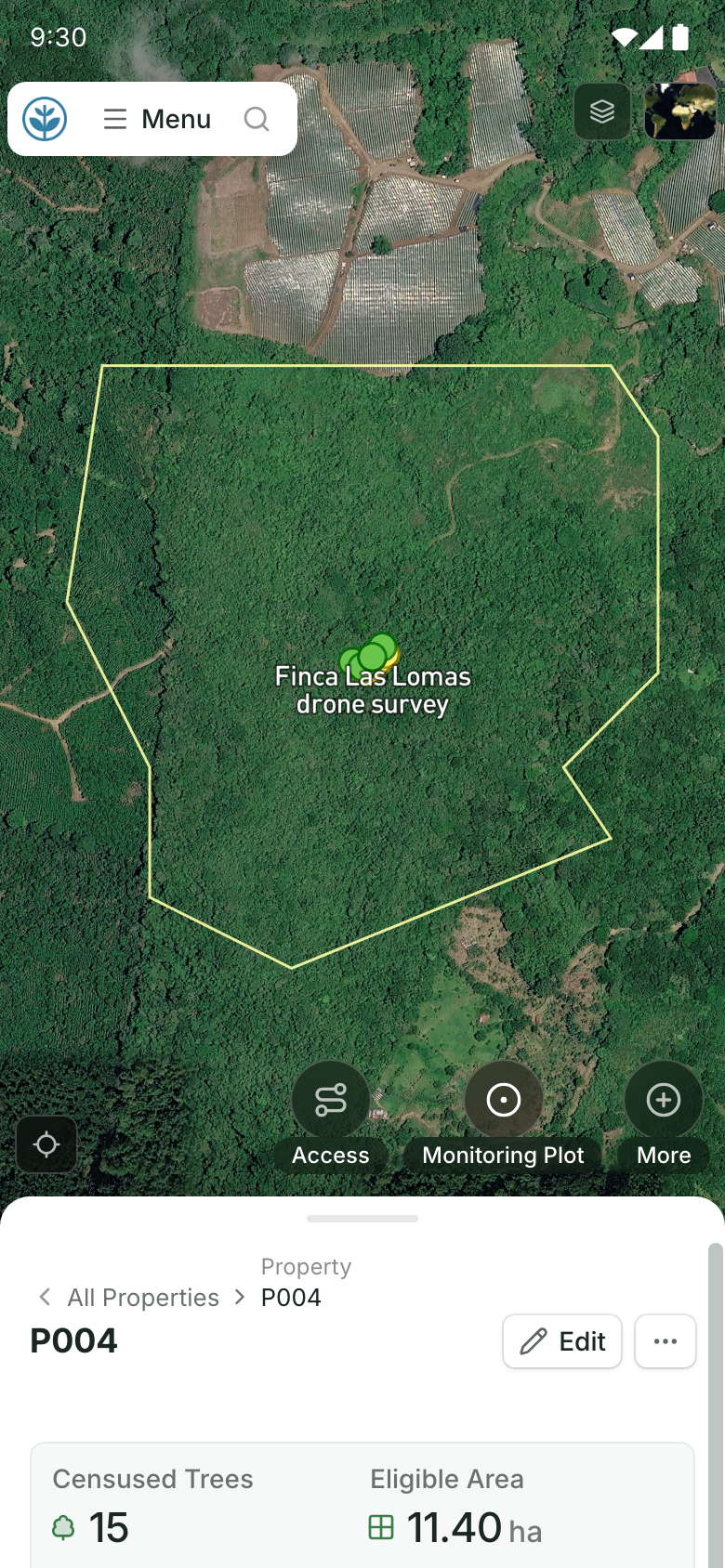
A site on a field team's phone.
Its boundary on the map and its record below, with buttons to add access, a monitoring plot and more. Demo project: names and numbers are made up.
Source: Restoration Scope products.
Forms and surveys
KoboToolbox · Best for structured surveys
Good fit: Plot assessments, household interviews, planting records, and other work that can be expressed as a structured form. KoboCollect supports offline collection on Android; browser-based web forms are another collection option. Data can be exported for analysis and mapping.
Think twice if: Your main need is maintaining a shared map or coordinating many linked operational records. First prove how revisits, identifiers, review, and reporting will work; collecting a submission is only one part of that system.
Team commitment: A form owner and a clear process for checking data. Include cleaning and reporting time when comparing cost.
Sources: collection options, KoboCollect, exports.
ArcGIS Survey123 · Best for form-led work in ArcGIS
Good fit: Form-led collection in an existing ArcGIS organization. Survey123 connects survey records to ArcGIS Online or Enterprise and supports online and offline form completion in its mobile app.
Think twice if: You do not otherwise need ArcGIS, or collectors mainly need to browse and edit mapped features. Compare the total ArcGIS setup with a standalone form tool; compare the map-led workflow with Field Maps.
Team commitment: Someone to own surveys, accounts, and the downstream use of the data. Confirm the user types and licenses required for authors and collectors.
Maps and GIS
QField + QFieldCloud · Best for teams already in QGIS
Good fit: A team with QGIS skills and a dedicated person who can maintain its field system. QField takes QGIS projects into online or offline fieldwork; QFieldCloud provides a synchronization workflow for teams.
Think twice if: Nobody can own layers, forms, project packaging, and sync issues. Technical capacity matters more than a long feature list. A supported implementation may still be viable, but include that service in the comparison.
Team commitment: A named GIS owner with time to maintain the project. Test two people updating field data, sync failures, attachments, and handover to a replacement administrator.
Sources: getting started, QFieldCloud synchronization.
ArcGIS Field Maps · Best for map-led work in ArcGIS
Good fit: Teams that already manage data in ArcGIS and need collectors to find, create, or update features on a map. Field Maps combines maps, forms, and field tasks, with prepared offline maps.
Think twice if: A straightforward questionnaire is the entire job, or adopting ArcGIS would introduce an ecosystem you do not otherwise need. Survey123 may suit the form-led part of the work better; the two can also share ArcGIS data.
Team commitment: A GIS owner to prepare layers, access, forms, and offline areas. Test changes to existing records as well as collection of new ones.
Sources: Field Maps overview, Survey123 and Field Maps.
More options by workflow
 ODK · Best for configurable forms you can host yourself
Consider ODK alongside KoboToolbox for form-led work. ODK Collect supports offline collection, location, photos, and complex forms; ODK offers managed hosting as well as a self-managed route. Compare the form design, administration, and support you actually need. Choosing managed hosting does not remove the need for a form and data owner.
Sources: getting started, ODK Collect.
 Mergin Maps · Best for QGIS teams comparing sync options
Compare Mergin Maps alongside QField when QGIS is already part of your work. Its mobile app supports offline field surveys using projects prepared in QGIS. Use the same pilot for both tools, and compare project setup, synchronization, support, and total cost. You still need someone to maintain the QGIS project.
Source: Mergin Maps offline workflow.
Terraware · Best for seeds, nurseries and monitoring
Consider Terraware when seed banking, nursery inventory, and planting-site monitoring are central to your work. Its nursery records connect seedling batches to seed accessions, and its monitoring workflow uses scheduled observations. Its strongest part is the nursery. Its structure is fixed, so your project adapts to it: check that its inventory and monitoring model matches your operations before trying to make it a general-purpose field app.
How to choose a field-data app
- Start with your existing system. If your data and skills are already in QGIS, compare QField and Mergin Maps. If they are in ArcGIS, compare Survey123 and Field Maps. If the job is a one-off survey, start with KoboToolbox and ODK. For a restoration workflow spanning several teams or seasons, compare a configured platform such as Restoration Scope with the cost of joining those tools yourself.
- Separate technical ability from available time. A team may know QGIS but have nobody available to maintain it. A dedicated, capable owner makes a configurable tool more practical. Without one, compare implementation and support services as part of the purchase.
- Ask who owns the work after launch. Who changes a form, fixes a failed sync, checks bad records, and trains new collectors? Wanting support does not select a single app: compare each provider's actual service scope and your team's remaining responsibilities.
- Compare total cost and your exit path. Include subscriptions, implementation, devices, training, maintenance, and data cleanup. Ask for a sample export with identifiers, geometry, photos, and relationships. Confirm current pricing, plan limits, and device support directly with the provider.
- Plan for verification if you sell carbon credits. A carbon project follows its methodology's sampling rules, measures individual trees, and keeps plot boundaries a registry will check. If it uses permanent plots, the team must find and remeasure them. Test revisits and boundary exports in your pilot, not only new surveys. Our guide to software for ARR carbon projects covers the rest of that stack, and carbon standards for nature projects compares what each standard asks for.
- Decide what you will do with the data. A field app collects records; it does not decide which questions they answer. Before the pilot, write down the four basic questions your planting data should answer and check that each app can answer them.
Run the same small pilot in two apps
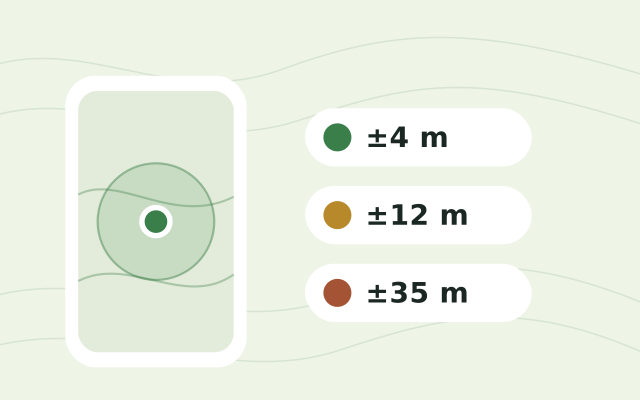
- Use one real survey or site, your intended phones, and two collectors. Include photos, GPS, and a revisit to an existing record. Check each phone's accuracy on site with the free GPS accuracy test.
- Prepare the devices, switch off connectivity, close and reopen the app, and finish the fieldwork.
- Reconnect both devices. Check submissions, edits, attachments, and how conflicting updates are handled.
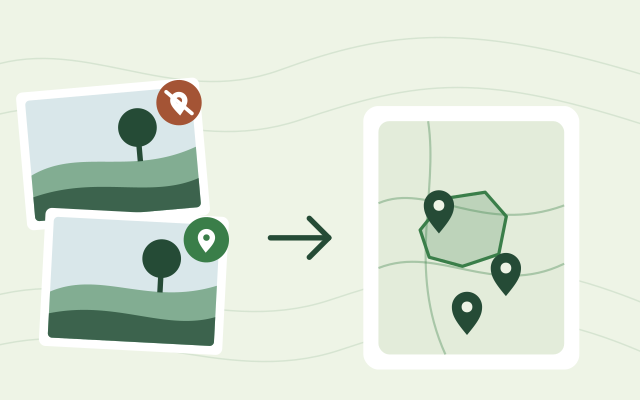
- Have an office colleague review the results and produce the report or export you actually need. Drop the field photos on the geotagged photo map to see which ones kept their location.
- Ask the future system owner to change a field and help a collector recover from a mistake.
Choose based on the work your team can complete and maintain. The most useful shortlist is the two tools that survive that pilot.
Related guides
- Software for ARR carbon projects: field data, monitoring plots, registry files and MRV.
- Restoration monitoring tools compared: frameworks, satellite data and platforms.
- explorer.land alternatives for donor and project portals: when the data has to reach funders.
- Tools for EUDR geolocation data: mapping plots for the EU Deforestation Regulation.
- Free GIS and field data tools: convert UTM coordinates, WKT and HEIC photos in the browser.
Frequently asked questions
What should I look for in an agroforestry monitoring app?
Six things, tested on your own phones at a real site. It works offline, records GPS points and polygons, keeps photos on their records, links repeat visits to the same plot or tree, checks data as it comes in, and exports CSV, GeoJSON or KML. Restoration Scope meets all six; form and GIS apps meet some out of the box and the rest with setup.
What is the best free app for collecting field data offline?
For form-based surveys, KoboToolbox and ODK are the usual free starting points. KoboToolbox's Community Plan is free for nonprofits, ODK is free if you host it yourself, and both collect data offline on Android. QField is free and open source for teams that already work in QGIS.
Should I use KoboToolbox or QField?
Use KoboToolbox when the work is a questionnaire, such as a plot assessment or a planting record. Use QField when the work is editing maps your team already keeps in QGIS, and someone on the team can maintain the QGIS project.
Do these apps work without mobile signal?
Yes, every field app in this guide documents offline collection, but they behave differently offline. Test your own forms, maps, photos and revisits with the phones switched to airplane mode before you choose.
Do I need ArcGIS to use Survey123 or Field Maps?
Mostly, yes. Both apps keep their data in ArcGIS Online or ArcGIS Enterprise, so you need an ArcGIS organization and the right user types to build forms and maps. Field Maps and private surveys need an account per collector; a public Survey123 survey can take responses without one.
How accurate is phone GPS for mapping restoration plots?
Phone GPS is typically accurate to around five metres under open sky and can be much worse under tree cover. Let the GPS settle before recording, and check your own phones on site with a free GPS accuracy test.
How do I test a field app before committing to it?
Run the same small pilot in two apps. Use one real site, two collectors and your own phones, work offline, then check what synced and whether the office can produce the report it needs.
Another question? Email us or book a call.