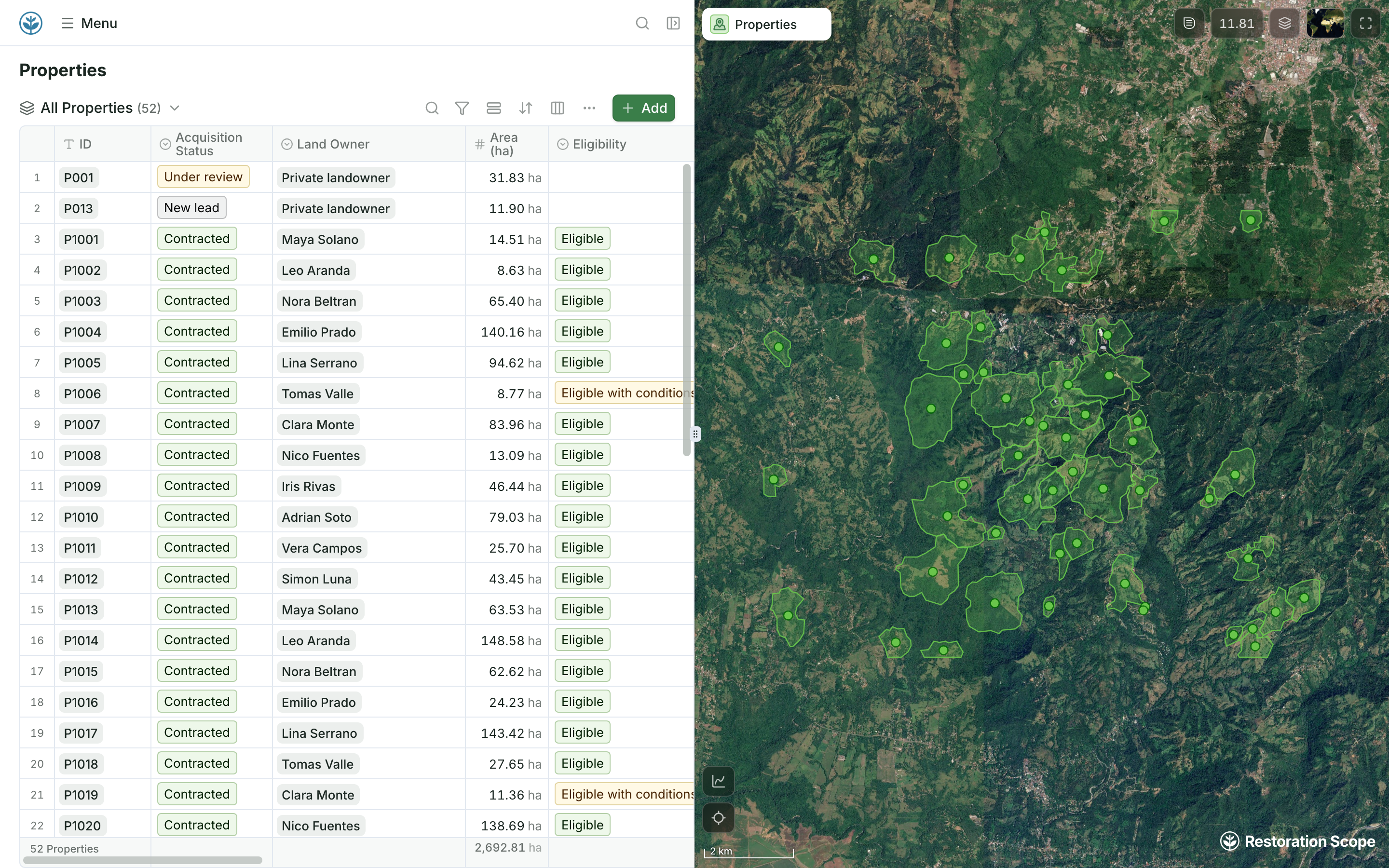
A table that is also a map
The rows a sheet would hold, each beside its boundary on the map.
Many nature restoration projects keep their records in Excel or Google Sheets, and the two are not equal. Excel files kept on laptops get emailed, copied and lost, and nobody knows which copy is current. A Google Sheet is one shared file with version history: move the Excel files there. Even a shared sheet is not built around maps. Sites become latitude and longitude columns, boundaries live in separate files and photos sit in folders. Restoration Scope keeps those records on a map of sites and polygons, and keeps reading your Google Sheet.
 Restoration Scope
  Excel and Google Sheets Excel and Google Sheets | Restoration Scope | |
|---|---|---|
| What it is | General-purpose spreadsheets: tables, formulas, charts and pivot tables, on the web, desktop and phones. | A restoration data platform: a configured field app, linked records, maps and portals. |
| Cost | Google Sheets is free with a Google account. Excel comes with Microsoft 365, and Excel for the web is free with a Microsoft account. Many teams already have one. | Priced per project after a scoping call. No public price list. |
| Sites on a map | Coordinates sit in two columns. Excel's map chart and Sheets' geo chart shade regions or mark named places, not latitude and longitude pairs; Excel's 3D Maps, on Windows, can plot points. To work with sites on a map, teams usually copy rows into another tool, such as Google My Maps. | Every site, plot and planting on one project map, in the browser and the Field App. |
| Boundaries and GIS files | No shape type in a cell. Polygons are pasted as text or kept as separate KML, GeoJSON or shapefiles; Excel's 3D Maps can import KML or shapefile regions to map data onto. Neither app checks that a shape is valid or still matches its row. | Points, lines and polygons drawn or walked on the project map, saved to their site. Shapefile, GeoJSON, KML and KMZ files come in and attach to their sites. |
| Photos | Images in cells, links to shared folders, or chat messages. The sheet does not read where a photo was taken. | Attached to the record, with place and time. |
| Field capture | Often typed in after the visit, or fed by a form such as Google Forms or Microsoft Forms. Neither form tool has a question that records a GPS point or boundary. | The Field App works offline: points, lines, polygons and photos. |
| Sharing and seasons | Emailed Excel files drift apart; a Google Sheet stays one shared file with version history. Survival checks still become a tab per season, joined by lookup formulas on site IDs you keep in sync. | One current record per site, linked to every visit, season after season. |
| Funder and verifier reporting | Charts and pivot tables, then maps, photos and boundary files often put together by hand for each report. | Donor portals built from the same records the team keeps. |
Google SheetsThe team keeps one shared Google Sheet, not Excel files.Restoration ScopeRestoration Scope keeps syncing as the sheet changes.Restoration ScopeIts rows join the project's records and map.Restoration Scope connects Google Sheets and keeps syncing as the sheet changes, so the sheet can stay where it works. Excel files come in once, as imports, so move them to Google Sheets first.
Checked against their makers' own pages on October 18, 2026: Excel map charts, Excel 3D Maps, 3D Maps custom regions, Excel for the web, Google Sheets, Sharing from Drive, Version history, Shared drives, Sheets geo charts, Google My Maps imports, Google Forms question types, Microsoft Forms questions.
These are Restoration Scope screens from our demo project and a public donor portal. To see Excel and Google Sheets, visit their own sites: Microsoft Excel and Google Sheets.
The rows a sheet would hold, each beside its boundary on the map.

A site keeps its boundary, monitoring plots and survival rate together, so nobody joins tabs by hand.
Of regions, yes: Excel's map chart and Sheets' geo chart shade countries, states or regions, and Excel's 3D Maps, on Windows desktop, can plot points. For sites with boundaries, teams usually copy rows into Google My Maps, which takes up to 2,000 rows per imported file, or into a GIS such as QGIS.
Keep latitude and longitude in decimal degrees, in separate columns, then import the file into a mapping tool: Google My Maps, QGIS, or Restoration Scope, where each row becomes a site on the project map. If your coordinates are in UTM, our free UTM to Lat/Long Converter changes them first.
For budgets, quick lists and analysis, no: keep the spreadsheet. Restoration Scope covers what spreadsheets were not built for in restoration: sites and boundaries on a map, photos tied to places, and survival checks tied to the right planting.
Google Sheets. Excel files kept on laptops get emailed, copied and lost, and nobody knows which copy is current. A Google Sheet is one shared file: send a link, see its version history, keep it in a shared drive. Restoration Scope also keeps syncing a Google Sheet as it changes, while an Excel file comes in once, as an import.
Restoration Scope publishes this comparison. Something out of date? Write to info@restorationscope.com.
Bring in the spreadsheets, field forms and maps you already use, and see every site in one place.